
PariPesa Registration Online: Sign Up by Phone or Email
▼ Table of Contents
PariPesa Registration: Two Ways to Create an Account
PariPesa registration is built around two separate forms — by phone or by email — and which one to use is a matter of preference rather than one being more “official” than the other. Both lead to the exact same account type, with the same access to sports betting, casino and live casino sections once finished.
| Method | Fields required | Verification |
|---|---|---|
| By phone | Phone number (with country code), currency, password, optional promo code | A confirmation code sent by SMS (or another sending method offered on the form) |
| By email | Country, region, city, email, phone number, first name, surname, currency, password, optional promo code | Email confirmation, plus phone verification later if needed |
Either way, a currency has to be selected from a dropdown before the form can be submitted — the exact list depends on the country code chosen for the phone field or the country selected on the email form, and South African Rand (ZAR) is the currency South African players would normally expect to see offered there. Both forms also require confirming that the account holder has read the Terms and Conditions and Privacy Policy, and that they’re at least 18 years old, before the “Register” button becomes active.
Completing a PariPesa Sign Up Step by Step
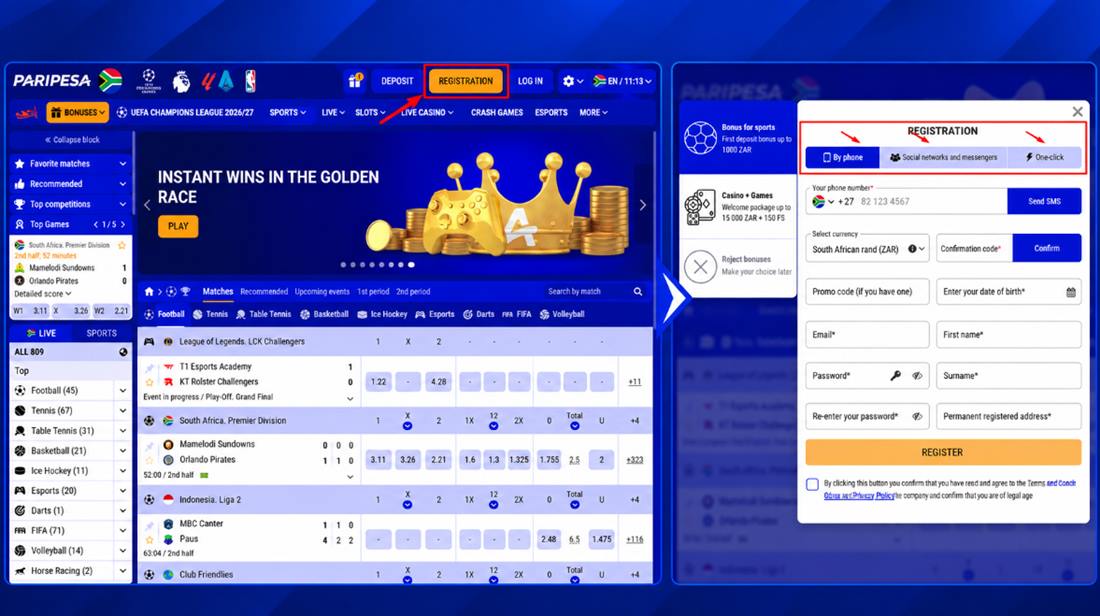
A PariPesa sign up follows the same short sequence regardless of which of the two forms is used:
- Open the registration page and choose “By phone” or “By email”.
- Fill in the required fields for that method — a phone number and currency for the phone form, or country, email, name and currency for the email form.
- For the phone method, choose a sending method (such as SMS) and request the confirmation code, then enter it in the confirmation code field.
- Set a password and, on the phone form, re-enter it to confirm.
- Enter a promo code in the optional field if one was provided — this step can simply be skipped otherwise.
- Confirm agreement to the Terms and Conditions and Privacy Policy, and that the account holder is 18 or older, then submit.
The account is active immediately after submission, with the newly selected currency and any entered promo code already attached to it — there’s no separate activation step or waiting period before the account can be used to browse odds, casino games or place a first deposit.
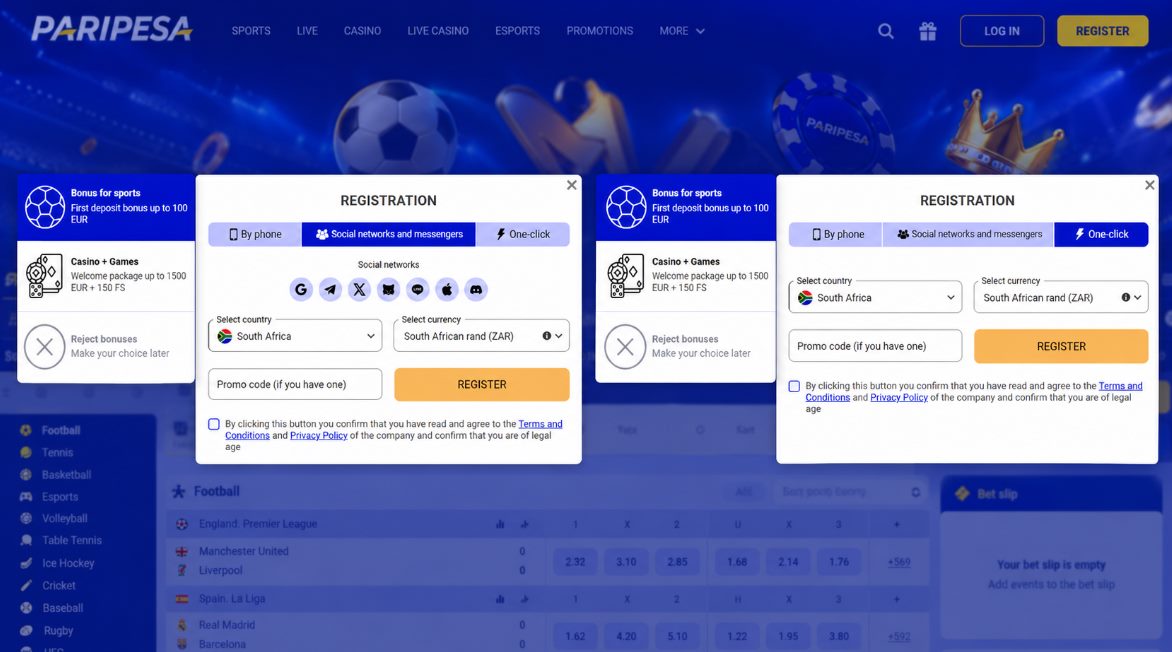
There are also two more options to register on our platform via:
- social networks and messangers
- one-click
A few issues account for most registration problems, and each has a straightforward fix:
| Issue | Fix |
|---|---|
| SMS confirmation code never arrives | Double-check the phone number and country code for typos, then request the code again or switch sending method if more than one is offered. |
| “Email already registered” message | An account already exists under that email — use the login screen and a password reset instead of registering again. |
| Passwords don’t match | Re-type both password fields rather than copy-pasting, since a trailing space is a common, invisible cause. |
| “Register” button stays inactive | The Terms and Conditions/Privacy Policy and 18+ confirmation checkboxes have to be ticked before the button unlocks. |
| Wrong currency selected | Contact support before making a first deposit — changing an account’s default currency is easier before any funds are involved. |
PariPesa Sign Up Bonus: What’s Waiting After Registration
Registering on its own doesn’t credit a PariPesa sign up bonus — the welcome package activates once the first qualifying deposit is made, not at the point of registration itself. What registering does is unlock eligibility: the account needs to be opted in to bonus offers (either during setup or afterward in account settings) before that first deposit, or the deposit goes through without a bonus attached. The full terms — the welcome package worth up to 1,500 EUR (roughly R27,900) plus 150 free spins, plus the separate first and second deposit bonuses — are covered in detail on the PariPesa bonus page, including the wagering requirements that apply before any of it becomes withdrawable.
PariPesa Register: What to Check Before You Submit
Before choosing to register a PariPesa account, a few details are worth getting right, since they’re harder to change afterward than they are to set correctly the first time. The currency selected during signup becomes the account’s default currency, and switching it later isn’t always straightforward — worth choosing South African Rand (or whichever currency actually matches how deposits will be made) rather than picking whatever appears first in the dropdown. Only one account is allowed per person: opening a second account with different details but the same identity, device, or payment method runs against standard account policy and can result in both accounts being restricted. And because a phone number or email only needs to be entered once, it’s worth double-checking for typos before submitting — a wrong digit in the phone field is one of the more common reasons an SMS confirmation code never arrives. In short, before you PariPesa register, get the currency, identity details and contact info right the first time.
These same account rules apply whether registration happens through the main site or through paripesa sa.
PariPesa Registration Online Login: Signing In Afterward
Once PariPesa registration online login is needed — meaning the account already exists and the next step is simply signing back in — the process is separate from the registration form itself. The same email or phone number and password used at signup are entered on the login screen rather than the registration screen, and no confirmation code is needed again unless a password reset or an unfamiliar device triggers a security check. The full walkthrough, including fixes for common sign-in problems, is covered on the PariPesa login page.
How to Delete a PariPesa Account
!
Fun fact: how to delete paripesa account
There’s no self-service “delete account” button in the settings menu. Because an account can hold an active balance, unsettled bets, or bonus funds still being wagered, account closure is handled directly by customer support rather than as an instant, one-click action — this protects both funds and personal data from being removed before everything on the account is properly settled. Anyone who wants to close their account should contact support through live chat, email, or Telegram, confirm their identity, and request account deletion; support will then walk through any remaining balance or open bets before closing it.
Knowing how to delete paripesa account, in short, comes down to reaching out to support rather than looking for a setting to toggle — the same channels covered on the customer care page handle this request.
FAQ
Can I complete PariPesa registration online without a phone number?
Yes – the email form only asks for a phone number as an optional field, so a phone number isn’t strictly required to register that way.
Do I get a bonus just for signing up?
No, the welcome package and deposit bonuses are triggered by a qualifying deposit, not by registration alone.
Can I change my account currency after registering?
The currency selected at registration becomes the account’s default, so it’s worth confirming it’s correct before submitting the form rather than trying to change it afterward.
How do I delete my PariPesa account?
By contacting customer support through live chat, email, or Telegram and requesting account closure – there’s no self-service deletion option.
Is a promo code required to register?
No, the promo code field on both registration forms is optional and can be left blank.

